<?xml version="1.0" encoding="utf-8"?><feed xmlns="http://www.w3.org/2005/Atom" ><generator uri="https://jekyllrb.com/" version="3.10.0">Jekyll</generator><link href="https://adamrushuk.github.io/feed.xml" rel="self" type="application/atom+xml" /><link href="https://adamrushuk.github.io/" rel="alternate" type="text/html" /><updated>2026-06-11T07:40:47+01:00</updated><id>https://adamrushuk.github.io/feed.xml</id><title type="html">The Hype-Pipe</title><subtitle>Passionate Automation lover, and DevOps advocate - falling down the Hype-Pipe, every day.</subtitle><author><name>Adam Rush</name></author><entry><title type="html">Configure Terraform’s OpenID Connect (OIDC) authentication from GitLab CI to Azure</title><link href="https://adamrushuk.github.io/configure-terraform-openid-connect-oidc-authentication-from-gitlab-ci-to-azure/" rel="alternate" type="text/html" title="Configure Terraform’s OpenID Connect (OIDC) authentication from GitLab CI to Azure" /><published>2024-02-24T00:00:00+00:00</published><updated>2024-02-24T00:00:00+00:00</updated><id>https://adamrushuk.github.io/configure-terraform-openid-connect-oidc-authentication-from-gitlab-ci-to-azure</id><content type="html" xml:base="https://adamrushuk.github.io/configure-terraform-openid-connect-oidc-authentication-from-gitlab-ci-to-azure/"><![CDATA[<h2 id="introduction">Introduction</h2>

<p>This post shows how to configure Terraform’s OpenID Connect (OIDC) authentication from GitLab CI to Azure, for both
the <a href="https://registry.terraform.io/providers/hashicorp/azurerm/latest/docs/guides/service_principal_oidc">azurerm provider</a>
<strong><em>and</em></strong> the <a href="https://developer.hashicorp.com/terraform/language/settings/backends/azurerm">azurerm backend</a>,
which until recently was blocked by a known issue. The <a href="https://github.com/hashicorp/terraform/issues/31802">issue</a>
was fixed in <a href="https://github.com/hashicorp/terraform/pull/31966">this PR</a> and released in
<a href="https://github.com/hashicorp/terraform/releases/tag/v1.3.4"><code class="language-plaintext highlighter-rouge">v1.3.4</code></a>.</p>

<p>The following step-by-step instructions and code examples can be found in my
<a href="https://gitlab.com/ARTestGroup99/terraform-oidc-azure-gitlab">terraform-oidc-azure-gitlab repo</a>.</p>

<h2 id="pre-reqs-quick-start">Pre-reqs (Quick Start)</h2>

<p>If you want to create all required resources in one go, ensure you have the
<a href="https://learn.microsoft.com/en-gb/cli/azure/">Azure CLI</a> installed, then follow the steps below:</p>

<ol>
  <li>Open <a href="https://gitlab.com/ARTestGroup99/terraform-oidc-azure-gitlab/-/blob/main/scripts/setup.sh"><code class="language-plaintext highlighter-rouge">./scripts/setup.sh</code></a>.</li>
  <li>Update the variables to suit your environment (esp <code class="language-plaintext highlighter-rouge">GITLAB_PROJECT_PATH</code>).</li>
  <li>Run <code class="language-plaintext highlighter-rouge">./scripts/setup.sh</code>.</li>
</ol>

<p>Alternatively, read through each section below to review each step.</p>

<h2 id="pre-reqs-step-by-step">Pre-reqs (Step-by-Step)</h2>

<h3 id="create-azure-ad-application-service-principal-and-federated-credential">Create Azure AD Application, Service Principal, and Federated Credential</h3>

<div class="language-bash highlighter-rouge"><div class="highlight"><pre class="highlight"><code><span class="c"># login</span>
az login

<span class="c"># vars - update these with your own values</span>
<span class="nv">APP_REG_NAME</span><span class="o">=</span><span class="s1">'gitlab.com_oidc'</span>
<span class="nv">GITLAB_URL</span><span class="o">=</span><span class="s1">'https://gitlab.com'</span>
<span class="nv">GITLAB_PROJECT_PATH</span><span class="o">=</span><span class="s1">'&lt;YOUR_GROUP_NAME&gt;/&lt;YOUR_PROJECT_NAME&gt;'</span>
<span class="nv">GITLAB_PROJECT_BRANCH_NAME</span><span class="o">=</span><span class="s1">'main'</span>

<span class="c"># create app reg / service principal</span>
<span class="nv">APP_CLIENT_ID</span><span class="o">=</span><span class="si">$(</span>az ad app create <span class="nt">--display-name</span> <span class="s2">"</span><span class="nv">$APP_REG_NAME</span><span class="s2">"</span> <span class="nt">--query</span> appId <span class="nt">--output</span> tsv<span class="si">)</span>
az ad sp create <span class="nt">--id</span> <span class="s2">"</span><span class="nv">$APP_CLIENT_ID</span><span class="s2">"</span> <span class="nt">--query</span> appId <span class="nt">--output</span> tsv

<span class="c"># create Azure AD federated identity credential</span>
<span class="c"># subject examples: https://docs.gitlab.com/ee/ci/cloud_services/#configure-a-conditional-role-with-oidc-claims</span>
<span class="nv">APP_OBJECT_ID</span><span class="o">=</span><span class="si">$(</span>az ad app show <span class="nt">--id</span> <span class="s2">"</span><span class="nv">$APP_CLIENT_ID</span><span class="s2">"</span> <span class="nt">--query</span> <span class="nb">id</span> <span class="nt">--output</span> tsv<span class="si">)</span>

<span class="c"># example subject: project_path:ARTestGroup99/terraform-oidc-azure-gitlab:ref_type:branch:ref:main</span>
<span class="nb">cat</span> <span class="o">&lt;&lt;</span><span class="no">EOF</span><span class="sh"> &gt; cred_params.json
{
  "name": "gitlab-federated-identity",
  "issuer": "</span><span class="k">${</span><span class="nv">GITLAB_URL</span><span class="k">}</span><span class="sh">",
  "subject": "project_path:</span><span class="k">${</span><span class="nv">GITLAB_PROJECT_PATH</span><span class="k">}</span><span class="sh">:ref_type:branch:ref:</span><span class="k">${</span><span class="nv">GITLAB_PROJECT_BRANCH_NAME</span><span class="k">}</span><span class="sh">",
  "description": "GitLab federated credential for </span><span class="k">${</span><span class="nv">GITLAB_PROJECT_PATH</span><span class="k">}</span><span class="sh">",
  "audiences": [
    "</span><span class="k">${</span><span class="nv">GITLAB_URL</span><span class="k">}</span><span class="sh">"
  ]
}
</span><span class="no">EOF

</span>az ad app federated-credential create <span class="nt">--id</span> <span class="s2">"</span><span class="nv">$APP_OBJECT_ID</span><span class="s2">"</span> <span class="nt">--parameters</span> <span class="s1">'cred_params.json'</span>
</code></pre></div></div>

<h3 id="assign-rbac-role-to-subscription">Assign RBAC Role to Subscription</h3>

<p>Run the code below to assign the <code class="language-plaintext highlighter-rouge">Contributor</code> RBAC role to the Subscription:</p>

<div class="language-bash highlighter-rouge"><div class="highlight"><pre class="highlight"><code><span class="nv">SUBSCRIPTION_ID</span><span class="o">=</span><span class="si">$(</span>az account show <span class="nt">--query</span> <span class="nb">id</span> <span class="nt">--output</span> tsv<span class="si">)</span>
az role assignment create <span class="nt">--role</span> <span class="s2">"Contributor"</span> <span class="nt">--assignee</span> <span class="s2">"</span><span class="nv">$APP_CLIENT_ID</span><span class="s2">"</span> <span class="nt">--scope</span> <span class="s2">"/subscriptions/</span><span class="nv">$SUBSCRIPTION_ID</span><span class="s2">"</span>
</code></pre></div></div>

<h3 id="create-terraform-backend-storage-and-assign-rbac-role-to-container">Create Terraform Backend Storage and Assign RBAC Role to Container</h3>

<p>Run the code below to create the Terraform storage and assign the <code class="language-plaintext highlighter-rouge">Storage Blob Data Contributor</code> RBAC role to the
container:</p>

<div class="language-bash highlighter-rouge"><div class="highlight"><pre class="highlight"><code><span class="c"># vars - update these with your own values</span>
<span class="nv">PREFIX</span><span class="o">=</span><span class="s1">'arshzgl'</span>
<span class="nv">LOCATION</span><span class="o">=</span><span class="s1">'eastus'</span>
<span class="nv">TERRAFORM_STORAGE_RG</span><span class="o">=</span><span class="s2">"</span><span class="k">${</span><span class="nv">PREFIX</span><span class="k">}</span><span class="s2">-rg-tfstate"</span>
<span class="nv">TERRAFORM_STORAGE_ACCOUNT</span><span class="o">=</span><span class="s2">"</span><span class="k">${</span><span class="nv">PREFIX</span><span class="k">}</span><span class="s2">sttfstate</span><span class="k">${</span><span class="nv">LOCATION</span><span class="k">}</span><span class="s2">"</span>
<span class="nv">TERRAFORM_STORAGE_CONTAINER</span><span class="o">=</span><span class="s2">"terraform"</span>

<span class="c"># resource group</span>
az group create <span class="nt">--location</span> <span class="s2">"</span><span class="nv">$LOCATION</span><span class="s2">"</span> <span class="nt">--name</span> <span class="s2">"</span><span class="nv">$TERRAFORM_STORAGE_RG</span><span class="s2">"</span>

<span class="c"># storage account</span>
<span class="nv">STORAGE_ID</span><span class="o">=</span><span class="si">$(</span>az storage account create <span class="nt">--name</span> <span class="s2">"</span><span class="nv">$TERRAFORM_STORAGE_ACCOUNT</span><span class="s2">"</span> <span class="se">\</span>
  <span class="nt">--resource-group</span> <span class="s2">"</span><span class="nv">$TERRAFORM_STORAGE_RG</span><span class="s2">"</span> <span class="nt">--location</span> <span class="s2">"</span><span class="nv">$LOCATION</span><span class="s2">"</span> <span class="nt">--sku</span> <span class="s2">"Standard_LRS"</span> <span class="nt">--query</span> <span class="nb">id</span> <span class="nt">--output</span> tsv<span class="si">)</span>

<span class="c"># storage container</span>
az storage container create <span class="nt">--name</span> <span class="s2">"</span><span class="nv">$TERRAFORM_STORAGE_CONTAINER</span><span class="s2">"</span> <span class="nt">--account-name</span> <span class="s2">"</span><span class="nv">$TERRAFORM_STORAGE_ACCOUNT</span><span class="s2">"</span>

<span class="c"># define container scope</span>
<span class="nv">TERRAFORM_STORAGE_CONTAINER_SCOPE</span><span class="o">=</span><span class="s2">"</span><span class="nv">$STORAGE_ID</span><span class="s2">/blobServices/default/containers/</span><span class="nv">$TERRAFORM_STORAGE_CONTAINER</span><span class="s2">"</span>
<span class="nb">echo</span> <span class="s2">"</span><span class="nv">$TERRAFORM_STORAGE_CONTAINER_SCOPE</span><span class="s2">"</span>

<span class="c"># assign rbac</span>
az role assignment create <span class="nt">--assignee</span> <span class="s2">"</span><span class="nv">$APP_CLIENT_ID</span><span class="s2">"</span> <span class="nt">--role</span> <span class="s2">"Storage Blob Data Contributor"</span> <span class="se">\</span>
  <span class="nt">--scope</span> <span class="s2">"</span><span class="nv">$TERRAFORM_STORAGE_CONTAINER_SCOPE</span><span class="s2">"</span>
</code></pre></div></div>

<h2 id="create-gitlab-repository-secrets">Create GitLab Repository Secrets</h2>

<p>Create the following <a href="https://docs.gitlab.com/ee/ci/variables/index.html">GitLab CI/CD variables</a> in
<code class="language-plaintext highlighter-rouge">https://gitlab.com/&lt;GROUP_NAME&gt;/&lt;PROJECT_NAME&gt;/-/settings/ci_cd</code>, using the code examples to show the required
values:</p>

<p><code class="language-plaintext highlighter-rouge">ARM_CLIENT_ID</code></p>

<div class="language-bash highlighter-rouge"><div class="highlight"><pre class="highlight"><code><span class="c"># use existing variable from previous step</span>
<span class="nb">echo</span> <span class="s2">"</span><span class="nv">$APP_CLIENT_ID</span><span class="s2">"</span>

<span class="c"># or use display name to get the app id</span>
<span class="nv">APP_CLIENT_ID</span><span class="o">=</span><span class="si">$(</span>az ad app list <span class="nt">--display-name</span> <span class="s2">"</span><span class="nv">$APP_REG_NAME</span><span class="s2">"</span> <span class="nt">--query</span> <span class="o">[]</span>.appId <span class="nt">--output</span> tsv<span class="si">)</span>
<span class="nb">echo</span> <span class="s2">"</span><span class="nv">$APP_CLIENT_ID</span><span class="s2">"</span>
</code></pre></div></div>

<p><code class="language-plaintext highlighter-rouge">ARM_SUBSCRIPTION_ID</code></p>

<div class="language-bash highlighter-rouge"><div class="highlight"><pre class="highlight"><code>az account show <span class="nt">--query</span> <span class="nb">id</span> <span class="nt">--output</span> tsv
</code></pre></div></div>

<p><code class="language-plaintext highlighter-rouge">ARM_TENANT_ID</code></p>

<div class="language-bash highlighter-rouge"><div class="highlight"><pre class="highlight"><code>az account show <span class="nt">--query</span> tenantId <span class="nt">--output</span> tsv
</code></pre></div></div>

<h2 id="terraform-oidc-authentication">Terraform OIDC Authentication</h2>

<h3 id="terraform-azurerm-backend">Terraform Azurerm Backend</h3>

<p>To enable OIDC authentication for the azurerm backend, apart from the standard
<a href="https://developer.hashicorp.com/terraform/language/settings/backends/azurerm#example-configuration">azurerm backend configuration</a>,
you must ensure you use at least Terraform version <code class="language-plaintext highlighter-rouge">1.3.4</code> as shown in the example below:</p>

<div class="language-hcl highlighter-rouge"><div class="highlight"><pre class="highlight"><code><span class="nx">terraform</span> <span class="p">{</span>
  <span class="nx">required_version</span> <span class="p">=</span> <span class="s2">"&gt;= 1.3.4"</span>

  <span class="nx">backend</span> <span class="s2">"azurerm"</span> <span class="p">{</span>
    <span class="nx">key</span> <span class="p">=</span> <span class="s2">"terraform.tfstate"</span>
  <span class="p">}</span>

  <span class="nx">required_providers</span> <span class="p">{</span>
    <span class="nx">azurerm</span> <span class="p">=</span> <span class="p">{</span>
      <span class="nx">source</span>  <span class="p">=</span> <span class="s2">"hashicorp/azurerm"</span>
      <span class="nx">version</span> <span class="p">=</span> <span class="s2">"~&gt; 3.92.0"</span>
    <span class="p">}</span>
  <span class="p">}</span>
<span class="p">}</span>
</code></pre></div></div>

<p>Only the backend <code class="language-plaintext highlighter-rouge">key</code> is defined above, as I use the <code class="language-plaintext highlighter-rouge">-backend-config</code> options during <code class="language-plaintext highlighter-rouge">terraform init</code> which
allows passing variables, eg:</p>

<div class="language-bash highlighter-rouge"><div class="highlight"><pre class="highlight"><code>terraform init <span class="se">\</span>
  <span class="nt">-backend-config</span><span class="o">=</span><span class="s2">"resource_group_name=</span><span class="nv">$TERRAFORM_STORAGE_RG</span><span class="s2">"</span> <span class="se">\</span>
  <span class="nt">-backend-config</span><span class="o">=</span><span class="s2">"storage_account_name=</span><span class="nv">$TERRAFORM_STORAGE_ACCOUNT</span><span class="s2">"</span> <span class="se">\</span>
  <span class="nt">-backend-config</span><span class="o">=</span><span class="s2">"container_name=</span><span class="nv">$TERRAFORM_STORAGE_CONTAINER</span><span class="s2">"</span>
</code></pre></div></div>

<h3 id="enable-oidc-authentication-using-gitlab-environment-variables">Enable OIDC Authentication using GitLab Environment Variables</h3>

<p>To enable OIDC authentication for both the azurerm backend and standard azurerm provider, use the following
GitLab CI <code class="language-plaintext highlighter-rouge">id_tokens</code> config and <code class="language-plaintext highlighter-rouge">variables</code> below:</p>

<div class="language-yaml highlighter-rouge"><div class="highlight"><pre class="highlight"><code><span class="na">default</span><span class="pi">:</span>
  <span class="na">id_tokens</span><span class="pi">:</span>
    <span class="na">GITLAB_OIDC_TOKEN</span><span class="pi">:</span>
      <span class="na">aud</span><span class="pi">:</span> <span class="s">https://gitlab.com</span>
      
<span class="na">variables</span><span class="pi">:</span>
  <span class="na">ARM_USE_OIDC</span><span class="pi">:</span> <span class="s2">"</span><span class="s">true"</span>
  <span class="na">ARM_OIDC_TOKEN</span><span class="pi">:</span> <span class="s">$GITLAB_OIDC_TOKEN</span>
</code></pre></div></div>

<p>To confirm OIDC authentication is being used, you can set the <code class="language-plaintext highlighter-rouge">TF_LOG</code> env var to <code class="language-plaintext highlighter-rouge">INFO</code>:</p>

<div class="language-yaml highlighter-rouge"><div class="highlight"><pre class="highlight"><code><span class="na">variables</span><span class="pi">:</span>
  <span class="na">TF_LOG</span><span class="pi">:</span> <span class="s2">"</span><span class="s">INFO"</span>
</code></pre></div></div>

<h2 id="running-the-terraform-pipeline">Running the Terraform Pipeline</h2>

<p>Once all previous steps have been successfully completed, follow the steps below to run the <code class="language-plaintext highlighter-rouge">terraform</code> pipeline:</p>

<ol>
  <li>Navigate to your project’s main page, eg <code class="language-plaintext highlighter-rouge">https://gitlab.com/&lt;YOUR_GROUP_NAME&gt;/&lt;YOUR_PROJECT_NAME&gt;</code></li>
  <li>In the left sidebar, click <code class="language-plaintext highlighter-rouge">Build &gt; Pipelines</code>.</li>
  <li>Above the list of pipeline runs, click <code class="language-plaintext highlighter-rouge">Run pipeline</code>.</li>
  <li>(optional) Change the <code class="language-plaintext highlighter-rouge">ENABLE_TERRAFORM_DESTROY_MODE</code> variable value to <code class="language-plaintext highlighter-rouge">true</code> to run Terraform Plan in “destroy mode”.</li>
  <li>Click <code class="language-plaintext highlighter-rouge">Run pipeline</code></li>
</ol>

<h2 id="clean-up">Clean Up</h2>

<p>Run <a href="https://gitlab.com/ARTestGroup99/terraform-oidc-azure-gitlab/-/blob/main/scripts/cleanup.sh"><code class="language-plaintext highlighter-rouge">./scripts/cleanup.sh</code></a>,
or use the code below to remove all created resources from this demo:</p>

<div class="language-bash highlighter-rouge"><div class="highlight"><pre class="highlight"><code><span class="c"># login</span>
az login

<span class="c"># vars - update these with your own values</span>
<span class="nv">APP_REG_NAME</span><span class="o">=</span><span class="s1">'gitlab.com_oidc'</span>
<span class="nv">PREFIX</span><span class="o">=</span><span class="s1">'arshzgl'</span>

<span class="c"># remove role assignment</span>
<span class="nv">APP_CLIENT_ID</span><span class="o">=</span><span class="si">$(</span>az ad app list <span class="nt">--display-name</span> <span class="s2">"</span><span class="nv">$APP_REG_NAME</span><span class="s2">"</span> <span class="nt">--query</span> <span class="o">[]</span>.appId <span class="nt">--output</span> tsv<span class="si">)</span>
<span class="nv">SUBSCRIPTION_ID</span><span class="o">=</span><span class="si">$(</span>az account show <span class="nt">--query</span> <span class="nb">id</span> <span class="nt">--output</span> tsv<span class="si">)</span>
az role assignment delete <span class="nt">--role</span> <span class="s2">"Contributor"</span> <span class="nt">--assignee</span> <span class="s2">"</span><span class="nv">$APP_CLIENT_ID</span><span class="s2">"</span> <span class="nt">--scope</span> <span class="s2">"/subscriptions/</span><span class="nv">$SUBSCRIPTION_ID</span><span class="s2">"</span>

<span class="c"># remove app reg</span>
<span class="nb">echo</span> <span class="s2">"Deleting app [</span><span class="nv">$APP_REG_NAME</span><span class="s2">] with App Client Id: [</span><span class="nv">$APP_CLIENT_ID</span><span class="s2">]..."</span>
az ad app delete <span class="nt">--id</span> <span class="s2">"</span><span class="nv">$APP_CLIENT_ID</span><span class="s2">"</span>

<span class="c"># list then remove resource groups (prompts before deletion)</span>
<span class="nv">QUERY</span><span class="o">=</span><span class="s2">"[?starts_with(name,'</span><span class="nv">$PREFIX</span><span class="s2">')].name"</span>
az group list <span class="nt">--query</span> <span class="s2">"</span><span class="nv">$QUERY</span><span class="s2">"</span> <span class="nt">--output</span> table
<span class="k">for </span>resource_group <span class="k">in</span> <span class="si">$(</span>az group list <span class="nt">--query</span> <span class="s2">"</span><span class="nv">$QUERY</span><span class="s2">"</span> <span class="nt">--output</span> tsv<span class="si">)</span><span class="p">;</span> <span class="k">do </span><span class="nb">echo</span> <span class="s2">"Delete Resource Group: </span><span class="k">${</span><span class="nv">resource_group</span><span class="k">}</span><span class="s2">"</span><span class="p">;</span> az group delete <span class="nt">--name</span> <span class="s2">"</span><span class="k">${</span><span class="nv">resource_group</span><span class="k">}</span><span class="s2">"</span><span class="p">;</span> <span class="k">done</span>
</code></pre></div></div>]]></content><author><name>Adam Rush</name></author><category term="terraform" /><category term="azure" /><category term="terraform" /><category term="azure" /><category term="gitlab" /><category term="oidc" /><summary type="html"><![CDATA[How to configure Terraform's OpenID Connect (OIDC) authentication from GitLab CI to Azure, for both the azurerm provider and the azurerm backend]]></summary></entry><entry><title type="html">How to find the default AKS version using Bash and PowerShell</title><link href="https://adamrushuk.github.io/how-to-find-the-default-aks-version-using-bash-and-powershell/" rel="alternate" type="text/html" title="How to find the default AKS version using Bash and PowerShell" /><published>2022-11-22T00:00:00+00:00</published><updated>2022-11-22T00:00:00+00:00</updated><id>https://adamrushuk.github.io/how-to-find-the-default-aks-version-using-bash-and-powershell</id><content type="html" xml:base="https://adamrushuk.github.io/how-to-find-the-default-aks-version-using-bash-and-powershell/"><![CDATA[<p>I always wondered how the default AKS version was selected via the Azure portal until I recently read this in the
<a href="https://learn.microsoft.com/en-us/azure/aks/supported-kubernetes-versions?tabs=azure-cli#azure-portal-and-cli-versions">docs</a>:</p>

<blockquote>
  <p>When you deploy an AKS cluster with Azure portal, Azure CLI, Azure PowerShell, the cluster defaults to the N-1
minor version and latest patch. For example, if AKS supports 1.17.a, 1.17.b, 1.16.c, 1.16.d, 1.15.e, and 1.15.f,
the default version selected is 1.16.c.</p>
</blockquote>

<p>Even though there are ways to <a href="https://learn.microsoft.com/en-us/azure/aks/auto-upgrade-cluster">auto-upgrade existing AKS clusters</a>
I typically use Terraform to provision clusters, so I prefer to have more control over what version to use -
and more importantly - when the upgrades occur.</p>

<p>Read on to see Bash and PowerShell examples for showing the default AKS version via the command-line.</p>

<h2 id="show-the-default-aks-version-using-bash">Show the default AKS version using Bash</h2>

<div class="language-bash highlighter-rouge"><div class="highlight"><pre class="highlight"><code><span class="c"># show all aks versions</span>
az aks get-versions <span class="nt">--location</span> <span class="s1">'uksouth'</span>

<span class="c"># show default aks version using a JMESPath query</span>
<span class="c"># https://learn.microsoft.com/en-us/cli/azure/query-azure-cli?tabs=concepts%2Cbash</span>
az aks get-versions <span class="nt">--location</span> <span class="s1">'uksouth'</span> <span class="nt">--output</span> <span class="s1">'tsv'</span> <span class="nt">--query</span> <span class="s1">'orchestrators | [?default].orchestratorVersion'</span>

<span class="c"># show default aks version using jq</span>
az aks get-versions <span class="nt">--location</span> <span class="s1">'uksouth'</span> | jq <span class="nt">-r</span> <span class="s1">'.orchestrators | .[] | select(.default==true) | .orchestratorVersion'</span>
</code></pre></div></div>

<h2 id="show-the-default-aks-version-using-powershell">Show the default AKS version using PowerShell</h2>

<div class="language-powershell highlighter-rouge"><div class="highlight"><pre class="highlight"><code><span class="c"># show all aks versions</span><span class="w">
</span><span class="n">Get-AzAksVersion</span><span class="w"> </span><span class="nt">-location</span><span class="w"> </span><span class="s1">'uksouth'</span><span class="w">

</span><span class="c"># show default aks version</span><span class="w">
</span><span class="p">(</span><span class="n">Get-AzAksVersion</span><span class="w"> </span><span class="nt">-location</span><span class="w"> </span><span class="s1">'uksouth'</span><span class="w"> </span><span class="o">|</span><span class="w"> </span><span class="n">Where-Object</span><span class="w"> </span><span class="nx">default</span><span class="p">)</span><span class="o">.</span><span class="nf">OrchestratorVersion</span><span class="w">

</span><span class="c"># show default aks version using az cli</span><span class="w">
</span><span class="p">((</span><span class="n">az</span><span class="w"> </span><span class="nx">aks</span><span class="w"> </span><span class="nx">get-versions</span><span class="w"> </span><span class="nt">--location</span><span class="w"> </span><span class="s1">'uksouth'</span><span class="w"> </span><span class="o">|</span><span class="w"> </span><span class="n">ConvertFrom-Json</span><span class="p">)</span><span class="o">.</span><span class="nf">orchestrators</span><span class="w"> </span><span class="o">|</span><span class="w"> </span><span class="n">Where-Object</span><span class="w"> </span><span class="nx">default</span><span class="p">)</span><span class="o">.</span><span class="nf">OrchestratorVersion</span><span class="w">
</span></code></pre></div></div>]]></content><author><name>Adam Rush</name></author><category term="aks" /><category term="aks" /><category term="azure" /><category term="bash" /><category term="kubernetes" /><category term="powershell" /><summary type="html"><![CDATA[Bash and PowerShell examples for showing the default AKS version]]></summary></entry><entry><title type="html">How to avoid backup deletion during Velero upgrades via Argo CD.</title><link href="https://adamrushuk.github.io/how-to-avoid-backup-deletion-during-velero-upgrades-via-argo-cd/" rel="alternate" type="text/html" title="How to avoid backup deletion during Velero upgrades via Argo CD." /><published>2022-11-02T00:00:00+00:00</published><updated>2022-11-02T00:00:00+00:00</updated><id>https://adamrushuk.github.io/how-to-avoid-backup-deletion-during-velero-upgrades-via-argo-cd</id><content type="html" xml:base="https://adamrushuk.github.io/how-to-avoid-backup-deletion-during-velero-upgrades-via-argo-cd/"><![CDATA[<h2 id="introduction">Introduction</h2>

<p>A quick tip on how to avoid backup deletion during <a href="https://velero.io/">Velero</a> upgrades via
<a href="https://argo-cd.readthedocs.io/en/stable/">Argo CD</a>.</p>

<h2 id="problem">Problem</h2>

<p>Initially when upgrading Velero with Argo CD, any backup objects created from a schedule would be pruned, as they
had no owner ref. Setting the schedule’s <code class="language-plaintext highlighter-rouge">useOwnerReferencesInBackup</code> value to <code class="language-plaintext highlighter-rouge">true</code> within the
<a href="https://github.com/vmware-tanzu/helm-charts/blob/68fc097c2b8997f5f6ab139dfb9f9ba11d154b47/charts/velero/values.yaml">Velero helm chart</a>
fixed that specific problem.</p>

<p>However, on subsequent Velero upgrades where the schedule was affected, <em>all</em> backups would also be removed, due to
the <code class="language-plaintext highlighter-rouge">useOwnerReferencesInBackup</code> setting.</p>

<h2 id="solution">Solution</h2>

<p>The fix was to use Argo CD’s <a href="https://argo-cd.readthedocs.io/en/stable/operator-manual/declarative-setup/#resource-exclusioninclusion">Resource Exclusion</a>
option, as shown below:</p>

<ol>
  <li>
    <p>Edit the <code class="language-plaintext highlighter-rouge">argocd-cm</code> configmap:</p>

    <div class="language-bash highlighter-rouge"><div class="highlight"><pre class="highlight"><code> kubectl edit configmap argocd-cm <span class="nt">--namespace</span> argocd
</code></pre></div>    </div>
  </li>
  <li>
    <p>Add exclusion block for velero backups:</p>

    <div class="language-yaml highlighter-rouge"><div class="highlight"><pre class="highlight"><code> <span class="s">data</span>
   <span class="s">resource.exclusions</span><span class="err">:</span> <span class="pi">|</span>
     <span class="s">- apiGroups:</span>
       <span class="s">- "velero.io"</span>
       <span class="s">kinds:</span>
       <span class="s">- Backup</span>
       <span class="s">clusters:</span>
       <span class="s">- "*"</span>
</code></pre></div>    </div>
  </li>
</ol>]]></content><author><name>Adam Rush</name></author><category term="kubernetes" /><category term="kubernetes" /><category term="argocd" /><category term="gitops" /><category term="velero" /><category term="backup" /><summary type="html"><![CDATA[Using ArgoCD resource.exclusions for velero to avoid backup deletion during Velero upgrades]]></summary></entry><entry><title type="html">AKS Periscope Log Collection</title><link href="https://adamrushuk.github.io/aks-periscope-log-collection/" rel="alternate" type="text/html" title="AKS Periscope Log Collection" /><published>2022-09-26T00:00:00+01:00</published><updated>2022-09-26T00:00:00+01:00</updated><id>https://adamrushuk.github.io/aks-periscope-log-collection</id><content type="html" xml:base="https://adamrushuk.github.io/aks-periscope-log-collection/"><![CDATA[<h2 id="problem">Problem</h2>

<p>Myself and several other Microsoft Engineers were recently struggling with intermittent AKS node issues. When the
issue occurred, the node(s) would not allow new pods to be created, or any method of connecting a terminal session.
In short, there was no method of collecting logs from these broken nodes.</p>

<h2 id="solution">Solution</h2>

<p>The solution for log collection was to deploy AKS Periscope (before the issues occurred).</p>

<h3 id="aks-periscope-overview">AKS Periscope Overview</h3>

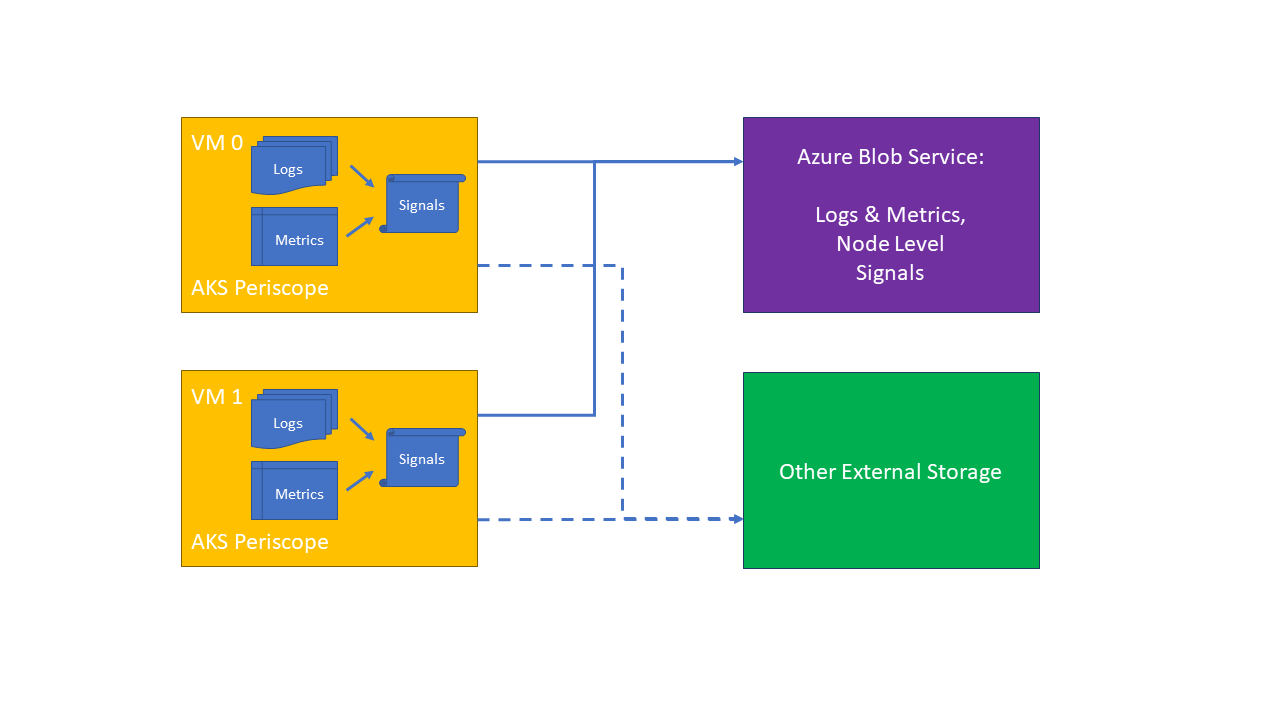
<p>AKS Periscope deploys a daemonset into your cluster which will collect useful logs from each node, including:</p>

<ul>
  <li>Container logs</li>
  <li>Docker and Kubelet system service logs.</li>
  <li>All node level logs</li>
  <li>VM and Kubernetes cluster level DNS settings.</li>
  <li>Describe Kubernetes objects</li>
  <li>System performance (kubectl top nodes and kubectl top pods).</li>
</ul>

<p>Excerpt from the <a href="https://github.com/Azure/aks-periscope">AKS Periscope</a> repo:</p>

<blockquote>
  <p>Hopefully most of the time, your AKS cluster is running happily and healthy. However, when &gt; things do go wrong, AKS
customers need a tool to help them diagnose and collect the logs necessary to troubleshoot &gt; the issue. It can be
difficult to collect the appropriate node and pod logs to figure what’s wrong, how to fix &gt; the problem, or even to
pass on those logs to others to help.</p>

  <p>AKS Periscope allows AKS customers to run initial diagnostics and collect and export the &gt; logs (such as into an
Azure Blob storage account) to help them analyze and identify potential problems or easily &gt; share the information to
support to help with the troubleshooting process with a simple <code class="language-plaintext highlighter-rouge">az aks kollect</code> command. &gt; These cluster issues are
often caused by incorrect cluster configuration, such as networking or permission issues. &gt; This tool will allow AKS
customers to run initial diagnostics and collect logs and custom analyses that helps them &gt; identify the underlying
problems.</p>
</blockquote>

<p><img src="/assets/images/posts/aks_periscope.png" alt="AKS Periscope Architecture" /></p>

<h3 id="aks-periscope-deployment-considerations">AKS Periscope Deployment Considerations</h3>

<p>I had issues using the <code class="language-plaintext highlighter-rouge">az aks kollect</code> deployment method, so opted for the <a href="https://github.com/Azure/aks-periscope#kustomize-deployment">Kustomize Deployment</a>
method, as this offered full customisation and greater control.</p>

<p>One additional requirement I had was for the AKS Periscope pods to run on system nodepools that had the <code class="language-plaintext highlighter-rouge">CriticalAddonsOnly=true:NoSchedule</code> taint applied. By default, they wouldn’t start on the system nodepools, so I had to add a toleration to the Kustomize definition (shown below).</p>

<h3 id="aks-periscope-deployment-script">AKS Periscope Deployment Script</h3>

<p>The <code class="language-plaintext highlighter-rouge">deploy_aks_periscope.sh</code> script will do the following:</p>

<ol>
  <li>Create a SAS token valid for 60 minutes.</li>
  <li>Deploy AKS Periscope into your cluster.</li>
  <li>Collect and save logs into the storage account specified (this collection only runs once).</li>
</ol>

<script src="https://gist.github.com/f892a29ad8cbfc900907c9b334cfee4f.js?file=deploy_aks_periscope.sh"> </script>

<h3 id="aks-periscope-update-script">AKS Periscope Update Script</h3>

<p>As the log collection only runs once, you will need to update <code class="language-plaintext highlighter-rouge">DIAGNOSTIC_RUN_ID</code> to trigger subsequent log collections.</p>

<p>The <code class="language-plaintext highlighter-rouge">update_aks_periscope.sh</code> script will do the following:</p>

<ol>
  <li>Create a SAS token valid for 60 minutes.</li>
  <li>Update the <code class="language-plaintext highlighter-rouge">azureblob-secret</code>.</li>
  <li>Trigger new log collection.</li>
  <li>Collect and save logs into the storage account specified.</li>
</ol>

<script src="https://gist.github.com/f892a29ad8cbfc900907c9b334cfee4f.js?file=update_aks_periscope.sh"> </script>]]></content><author><name>Adam Rush</name></author><category term="kubernetes" /><category term="kubernetes" /><category term="aks" /><category term="azure" /><category term="bash" /><summary type="html"><![CDATA[A Bash script that deploys AKS Periscope into an AKS cluster]]></summary></entry><entry><title type="html">AKS Disk Detach Wait Scripts</title><link href="https://adamrushuk.github.io/aks-disk-detach-wait-scripts/" rel="alternate" type="text/html" title="AKS Disk Detach Wait Scripts" /><published>2022-09-20T00:00:00+01:00</published><updated>2022-09-20T00:00:00+01:00</updated><id>https://adamrushuk.github.io/aks-disk-detach-wait-scripts</id><content type="html" xml:base="https://adamrushuk.github.io/aks-disk-detach-wait-scripts/"><![CDATA[<h2 id="problem">Problem</h2>

<p>I had to automate some AKS tasks, which could only continue when disks had detached from their nodes. The solution
should accept AKS cluster and PVC names, then wait for the disks to no longer show as <code class="language-plaintext highlighter-rouge">Attached</code>, and also be
available in both PowerShell and Bash.</p>

<h2 id="powershell-solution">PowerShell Solution</h2>

<script src="https://gist.github.com/3dabe2e45e1a6e0b29cc3d622476382a.js?file=aks-disk-detach-wait.ps1"> </script>

<h2 id="bash-solution">Bash Solution</h2>

<script src="https://gist.github.com/3dabe2e45e1a6e0b29cc3d622476382a.js?file=aks-disk-detach-wait.sh"> </script>]]></content><author><name>Adam Rush</name></author><category term="kubernetes" /><category term="kubernetes" /><category term="aks" /><category term="azure" /><category term="powershell" /><category term="bash" /><summary type="html"><![CDATA[PowerShell and Bash scripts that wait for an AKS disk to detach]]></summary></entry><entry><title type="html">Using the setproduct function in Terraform</title><link href="https://adamrushuk.github.io/using-the-setproduct-function-in-terraform/" rel="alternate" type="text/html" title="Using the setproduct function in Terraform" /><published>2022-08-26T00:00:00+01:00</published><updated>2022-08-26T00:00:00+01:00</updated><id>https://adamrushuk.github.io/using-the-setproduct-function-in-terraform</id><content type="html" xml:base="https://adamrushuk.github.io/using-the-setproduct-function-in-terraform/"><![CDATA[<h2 id="scenario">Scenario</h2>

<p>I needed a way to create all possible combinations from two lists. The first was a list of Azure AD Roles, and the second was a list of target Resource Groups where the AAD Roles should be assigned.</p>

<h2 id="solution">Solution</h2>

<p>The solution was using <a href="https://www.terraform.io/language/functions/setproduct">Terraform’s built-in <code class="language-plaintext highlighter-rouge">setproduct</code> function</a>.</p>

<blockquote>
  <p>The setproduct function finds all of the possible combinations of elements from all of the given sets by computing the Cartesian product.</p>
</blockquote>

<h3 id="code-example">Code Example</h3>

<div class="language-bash highlighter-rouge"><div class="highlight"><pre class="highlight"><code><span class="c"># Create all possible combinations from two lists, and loop through result to assign roles</span>
<span class="c"># https://www.terraform.io/docs/language/functions/setproduct.html</span>

provider <span class="s2">"azurerm"</span> <span class="o">{</span>
  features <span class="o">{}</span>
<span class="o">}</span>

terraform <span class="o">{</span>
  required_version <span class="o">=</span> <span class="s2">"&gt;= 1.0"</span>
  required_providers <span class="o">{</span>
    azurerm <span class="o">=</span> <span class="o">{</span>
      <span class="nb">source</span>  <span class="o">=</span> <span class="s2">"hashicorp/azurerm"</span>
      version <span class="o">=</span> <span class="s2">"~&gt; 3.20.0"</span>
    <span class="o">}</span>
  <span class="o">}</span>
<span class="o">}</span>

locals <span class="o">{</span>
  roles <span class="o">=</span> <span class="o">[</span>
    <span class="s2">"Storage Blob Data Owner"</span>,
    <span class="s2">"Key Vault Contributor"</span>,
  <span class="o">]</span>
  scopes <span class="o">=</span> <span class="o">[</span>
    <span class="s2">"/subscriptions/SUB_NAME/resourceGroups/rg1"</span>,
    <span class="s2">"/subscriptions/SUB_NAME/resourceGroups/rg2"</span>,
  <span class="o">]</span>

  role_scopes_product <span class="o">=</span> setproduct<span class="o">(</span>local.roles, local.scopes<span class="o">)</span>

  <span class="c"># Setproduct produces a structure like this for role_scopes_product:</span>
  <span class="c"># [</span>
  <span class="c">#   [</span>
  <span class="c">#     "Storage Blob Data Owner",</span>
  <span class="c">#     "/subscriptions/SUB_NAME/resourceGroups/rg1",</span>
  <span class="c">#   ],</span>
  <span class="c">#   [</span>
  <span class="c">#     "Storage Blob Data Owner",</span>
  <span class="c">#     "/subscriptions/SUB_NAME/resourceGroups/rg2",</span>
  <span class="c">#   ],</span>
  <span class="c">#   [</span>
  <span class="c">#     "Key Vault Contributor",</span>
  <span class="c">#     "/subscriptions/SUB_NAME/resourceGroups/rg1",</span>
  <span class="c">#   ],</span>
  <span class="c">#   [</span>
  <span class="c">#     "Key Vault Contributor",</span>
  <span class="c">#     "/subscriptions/SUB_NAME/resourceGroups/rg2",</span>
  <span class="c">#   ],</span>
  <span class="c"># ]</span>


  <span class="c"># Build a map from the above "list of lists", using a compound key of both list values, and the map value being the original list of the role and scope</span>
  role_scopes_map_of_lists <span class="o">=</span> <span class="o">{</span> <span class="k">for </span>role_scope <span class="k">in </span>local.role_scopes_product : <span class="s2">"</span><span class="k">${</span><span class="nv">role_scope</span><span class="p">[0]</span><span class="k">}</span><span class="s2">-</span><span class="k">${</span><span class="nv">role_scope</span><span class="p">[1]</span><span class="k">}</span><span class="s2">"</span> <span class="o">=&gt;</span> role_scope <span class="o">}</span>

  <span class="c"># role_scopes_map_of_lists looks like this:</span>
  <span class="c"># {</span>
  <span class="c">#   "Key Vault Contributor-/subscriptions/SUB_NAME/resourceGroups/rg1" = [</span>
  <span class="c">#     "Key Vault Contributor",</span>
  <span class="c">#     "/subscriptions/SUB_NAME/resourceGroups/rg1",</span>
  <span class="c">#   ]</span>
  <span class="c">#   "Key Vault Contributor-/subscriptions/SUB_NAME/resourceGroups/rg2" = [</span>
  <span class="c">#     "Key Vault Contributor",</span>
  <span class="c">#     "/subscriptions/SUB_NAME/resourceGroups/rg2",</span>
  <span class="c">#   ]</span>
  <span class="c">#   "Storage Blob Data Owner-/subscriptions/SUB_NAME/resourceGroups/rg1" = [</span>
  <span class="c">#     "Storage Blob Data Owner",</span>
  <span class="c">#     "/subscriptions/SUB_NAME/resourceGroups/rg1",</span>
  <span class="c">#   ]</span>
  <span class="c">#   "Storage Blob Data Owner-/subscriptions/SUB_NAME/resourceGroups/rg2" = [</span>
  <span class="c">#     "Storage Blob Data Owner",</span>
  <span class="c">#     "/subscriptions/SUB_NAME/resourceGroups/rg2",</span>
  <span class="c">#   ]</span>
  <span class="c"># }</span>


  role_scopes_map_of_maps <span class="o">=</span> <span class="o">{</span>
    <span class="k">for </span>role_scope <span class="k">in </span>local.role_scopes_product : <span class="s2">"</span><span class="k">${</span><span class="nv">role_scope</span><span class="p">[0]</span><span class="k">}</span><span class="s2">-</span><span class="k">${</span><span class="nv">role_scope</span><span class="p">[1]</span><span class="k">}</span><span class="s2">"</span> <span class="o">=&gt;</span> <span class="o">{</span>
        <span class="s2">"role_name"</span> <span class="o">=</span> role_scope[0],
        <span class="s2">"scope"</span> <span class="o">=</span> role_scope[1]
    <span class="o">}</span>
  <span class="o">}</span>

  <span class="c"># role_scopes_map_of_maps looks like this:</span>
  <span class="c"># {</span>
  <span class="c">#   "Key Vault Contributor-/subscriptions/SUB_NAME/resourceGroups/rg1" = {</span>
  <span class="c">#     "role_name" = "Key Vault Contributor"</span>
  <span class="c">#     "scope" = "/subscriptions/SUB_NAME/resourceGroups/rg1"</span>
  <span class="c">#   }</span>
  <span class="c">#   "Key Vault Contributor-/subscriptions/SUB_NAME/resourceGroups/rg2" = {</span>
  <span class="c">#     "role_name" = "Key Vault Contributor"</span>
  <span class="c">#     "scope" = "/subscriptions/SUB_NAME/resourceGroups/rg2"</span>
  <span class="c">#   }</span>
  <span class="c">#   "Storage Blob Data Owner-/subscriptions/SUB_NAME/resourceGroups/rg1" = {</span>
  <span class="c">#     "role_name" = "Storage Blob Data Owner"</span>
  <span class="c">#     "scope" = "/subscriptions/SUB_NAME/resourceGroups/rg1"</span>
  <span class="c">#   }</span>
  <span class="c">#   "Storage Blob Data Owner-/subscriptions/SUB_NAME/resourceGroups/rg2" = {</span>
  <span class="c">#     "role_name" = "Storage Blob Data Owner"</span>
  <span class="c">#     "scope" = "/subscriptions/SUB_NAME/resourceGroups/rg2"</span>
  <span class="c">#   }</span>
  <span class="c"># }</span>
<span class="o">}</span>

<span class="c"># resource groups</span>
resource <span class="s2">"azurerm_resource_group"</span> <span class="s2">"rg1"</span> <span class="o">{</span>
  name     <span class="o">=</span> <span class="s2">"rg1"</span>
  location <span class="o">=</span> <span class="s2">"uksouth"</span>
<span class="o">}</span>

resource <span class="s2">"azurerm_resource_group"</span> <span class="s2">"rg2"</span> <span class="o">{</span>
  name     <span class="o">=</span> <span class="s2">"rg2"</span>
  location <span class="o">=</span> <span class="s2">"uksouth"</span>
<span class="o">}</span>

data <span class="s2">"azurerm_client_config"</span> <span class="s2">"current"</span> <span class="o">{}</span>
data <span class="s2">"azuread_service_principal"</span> <span class="s2">"current"</span> <span class="o">{</span>
  application_id <span class="o">=</span> data.azurerm_client_config.current.client_id
<span class="o">}</span>

<span class="c"># maps of lists loop example</span>
resource <span class="s2">"azurerm_role_assignment"</span> <span class="s2">"map_of_lists"</span> <span class="o">{</span>
  for_each             <span class="o">=</span> local.role_scopes_map_of_lists
  scope                <span class="o">=</span> each.value[1]
  role_definition_name <span class="o">=</span> each.value[0]
  principal_id         <span class="o">=</span> <span class="s2">"MY_USER_ID"</span>
<span class="o">}</span>

<span class="c"># maps of maps loop example</span>
resource <span class="s2">"azurerm_role_assignment"</span> <span class="s2">"map_of_maps"</span> <span class="o">{</span>
  for_each             <span class="o">=</span> local.role_scopes_map_of_maps
  scope                <span class="o">=</span> each.value.scope
  role_definition_name <span class="o">=</span> each.value.role_name
  principal_id         <span class="o">=</span> data.azuread_service_principal.current.object_id
<span class="o">}</span>
</code></pre></div></div>

<h3 id="code-usage">Code Usage</h3>

<p>Save the code example to a local file, then run the commands below view the data structures etc:</p>

<div class="language-bash highlighter-rouge"><div class="highlight"><pre class="highlight"><code><span class="c"># init</span>
terraform init

<span class="c"># enter console</span>
terraform console

<span class="c"># output locals to view data structures</span>
<span class="c"># show all list variations</span>
local.role_scopes_product

<span class="c"># show the map of lists</span>
local.role_scopes_map_of_lists

<span class="c"># show the nested map</span>
local.role_scopes_map_of_maps

<span class="c"># exit console</span>

<span class="c"># show plan</span>
terraform plan
</code></pre></div></div>]]></content><author><name>Adam Rush</name></author><category term="terraform" /><category term="terraform" /><category term="hashicorp" /><summary type="html"><![CDATA[Using the setproduct function in Terraform]]></summary></entry><entry><title type="html">Running KinD in GitLab CI on Kubernetes</title><link href="https://adamrushuk.github.io/running-kind-in-gitlab-ci-on-kubernetes/" rel="alternate" type="text/html" title="Running KinD in GitLab CI on Kubernetes" /><published>2021-03-22T00:00:00+00:00</published><updated>2021-03-22T00:00:00+00:00</updated><id>https://adamrushuk.github.io/running-kind-in-gitlab-ci-on-kubernetes</id><content type="html" xml:base="https://adamrushuk.github.io/running-kind-in-gitlab-ci-on-kubernetes/"><![CDATA[<h2 id="introduction">Introduction</h2>

<p><a href="https://docs.gitlab.com/ee/ci/">GitLab CI/CD</a> is a tool built into <a href="https://about.gitlab.com/">GitLab</a> for
software development through the continuous methodologies.</p>

<p>GitLab CI is configured via the <a href="https://docs.gitlab.com/ee/ci/yaml/gitlab_ci_yaml.html">.gitlab-ci.yml file</a>, and
the <a href="https://docs.gitlab.com/ee/ci/yaml/README.html">.gitlab-ci.yml reference documentation</a> is excellent. The
overall GitLab documentation is some of the best out there, however, not all use-cases for using GitLab CI are
covered.</p>

<p>Whilst working on a Helm Chart pipeline, I wanted to bring together many of the testing steps I’ve used in other
pipelines. This included validation, linting, and installing.</p>

<h2 id="problem">Problem</h2>

<p>The problem was the Helm Chart test pipeline required a nested Kubernetes environment, as our self-hosted
GitLab runs on Kubernetes. DinD (Docker in Docker) and KinD (Kubernetes in Docker) solved the nested requirement,
but errors were occurring.</p>

<h2 id="solution">Solution</h2>

<h3 id="custom-gitlab-runner">Custom GitLab Runner</h3>

<p>The solution was to configure a custom <a href="https://gitlab.com/gitlab-org/charts/gitlab-runner">GitLab Runner</a> with four
volumes:</p>

<ol>
  <li>docker-certs: <code class="language-plaintext highlighter-rouge">/certs/client</code> (secure TLS connection)</li>
  <li>dind-storage: <code class="language-plaintext highlighter-rouge">/var/lib/docker</code></li>
  <li>hostpath-modules: <code class="language-plaintext highlighter-rouge">/lib/modules</code></li>
  <li>hostpath-cgroup: <code class="language-plaintext highlighter-rouge">/sys/fs/cgroup</code></li>
</ol>

<p>The relevant GitLab Runner config is shown below:</p>

<div class="language-yaml highlighter-rouge"><div class="highlight"><pre class="highlight"><code><span class="na">runners</span><span class="pi">:</span>
  <span class="na">config</span><span class="pi">:</span> <span class="pi">|</span>
    <span class="s">[[runners]]</span>
      <span class="s">[runners.kubernetes]</span>
        <span class="s">image = "ubuntu:20.04"</span>
        <span class="s">privileged = true</span>
      <span class="s">[[runners.kubernetes.volumes.empty_dir]]</span>
        <span class="s">name = "docker-certs"</span>
        <span class="s">mount_path = "/certs/client"</span>
        <span class="s">medium = "Memory"</span>
      <span class="s">[[runners.kubernetes.volumes.empty_dir]]</span>
        <span class="s">name = "dind-storage"</span>
        <span class="s">mount_path = "/var/lib/docker"</span>
      <span class="s">[[runners.kubernetes.volumes.host_path]]</span>
        <span class="s">name = "hostpath-modules"</span>
        <span class="s">mount_path = "/lib/modules"</span>
        <span class="s">read_only = true</span>
        <span class="s">host_path = "/lib/modules"</span>
      <span class="s">[[runners.kubernetes.volumes.host_path]]</span>
        <span class="s">name = "hostpath-cgroup"</span>
        <span class="s">mount_path = "/sys/fs/cgroup"</span>
        <span class="s">host_path = "/sys/fs/cgroup"</span>
  <span class="na">tags</span><span class="pi">:</span> <span class="s2">"</span><span class="s">dind"</span>
</code></pre></div></div>

<p>I’ve uploaded the full
<a href="https://github.com/adamrushuk/charts/blob/main/charts/gitlab-runner-dind/values.yaml">helm chart values for Docker-in-Docker (DinD) config to support installing KinD nodes</a>.</p>

<p>For more information, read the <a href="https://docs.gitlab.com/runner/executors/kubernetes.html#using-volumes">GitLab documentation on using volumes with the GitLab Runner’s Kubernetes executor</a>.</p>

<h3 id="gitlab-ci-configuration">GitLab CI Configuration</h3>

<p>With the custom GitLab Runner configured with the required four volumes, the following <code class="language-plaintext highlighter-rouge">.gitlab-ci.yml</code>
configuration was used for the Helm Chart pipeline (some code removed for brevity):</p>

<div class="language-yaml highlighter-rouge"><div class="highlight"><pre class="highlight"><code><span class="c1"># Helm Chart Pipeline</span>
<span class="na">image</span><span class="pi">:</span> <span class="s">&lt;HELM_RELEASE_PIPELINE_IMAGE&gt;</span>

<span class="na">variables</span><span class="pi">:</span>
  <span class="c1"># When using dind service, we need to instruct docker to talk with</span>
  <span class="c1"># the daemon started inside of the service. The daemon is available</span>
  <span class="c1"># with a network connection instead of the default</span>
  <span class="c1"># /var/run/docker.sock socket.</span>
  <span class="c1"># port 2375 for no TLS connection (insecure)</span>
  <span class="c1"># port 2376 for TLS connection</span>
  <span class="na">DOCKER_HOST</span><span class="pi">:</span> <span class="s">tcp://docker:2376</span>

  <span class="c1"># Specify to Docker where to create the certificates, Docker will</span>
  <span class="c1"># create them automatically on boot, and will create</span>
  <span class="c1"># `/certs/client` that will be shared between the service and job</span>
  <span class="c1"># container, thanks to volume mount from config.toml</span>
  <span class="na">DOCKER_TLS_CERTDIR</span><span class="pi">:</span> <span class="s2">"</span><span class="s">/certs"</span>
  
  <span class="c1"># These are usually specified by the entrypoint, however the</span>
  <span class="c1"># Kubernetes executor doesn't run entrypoints</span>
  <span class="c1"># https://gitlab.com/gitlab-org/gitlab-runner/-/issues/4125</span>
  <span class="na">DOCKER_TLS_VERIFY</span><span class="pi">:</span> <span class="m">1</span>
  <span class="na">DOCKER_CERT_PATH</span><span class="pi">:</span> <span class="s2">"</span><span class="s">$DOCKER_TLS_CERTDIR/client"</span>

  <span class="c1"># Disable 'shallow clone'</span>
  <span class="na">GIT_DEPTH</span><span class="pi">:</span> <span class="m">0</span>

<span class="na">services</span><span class="pi">:</span>
  <span class="c1"># service image (eg: svc-0) - contains docker daemon (engine)</span>
  <span class="pi">-</span> <span class="s">docker:19.03.13-dind</span>

<span class="c1"># Use variables to decide what triggers the pipeline</span>
<span class="c1"># https://docs.gitlab.com/ee/ci/variables/predefined_variables.html</span>
<span class="na">workflow</span><span class="pi">:</span>
  <span class="na">rules</span><span class="pi">:</span>
    <span class="c1"># https://docs.gitlab.com/ee/ci/yaml/README.html#workflowrules</span>
    <span class="c1"># Only trigger on a Merge Request</span>
    <span class="pi">-</span> <span class="na">if</span><span class="pi">:</span> <span class="s1">'</span><span class="s">$CI_PIPELINE_SOURCE</span><span class="nv"> </span><span class="s">==</span><span class="nv"> </span><span class="s">"merge_request_event"'</span>
    <span class="c1"># Allow manual trigger via the GUI</span>
    <span class="pi">-</span> <span class="na">if</span><span class="pi">:</span> <span class="s1">'</span><span class="s">$CI_PIPELINE_SOURCE</span><span class="nv"> </span><span class="s">==</span><span class="nv"> </span><span class="s">"web"'</span>

<span class="na">stages</span><span class="pi">:</span>
  <span class="pi">-</span> <span class="s">validate</span>
  <span class="pi">-</span> <span class="s">lint</span>
  <span class="pi">-</span> <span class="s">install</span>

<span class="na">validate</span><span class="pi">:</span>
  <span class="na">tags</span><span class="pi">:</span>
    <span class="pi">-</span> <span class="s">dind</span>
  <span class="na">stage</span><span class="pi">:</span> <span class="s">validate</span>
  <span class="na">parallel</span><span class="pi">:</span>
    <span class="na">matrix</span><span class="pi">:</span>
      <span class="pi">-</span> <span class="na">K8S_VERSION</span><span class="pi">:</span>
          <span class="pi">-</span> <span class="s">1.17.17</span>
          <span class="pi">-</span> <span class="s">1.18.15</span>
          <span class="pi">-</span> <span class="s">1.19.7</span>
  <span class="na">script</span><span class="pi">:</span>
    <span class="pi">-</span> <span class="s">echo "this is the validate stage"</span>

<span class="na">lint</span><span class="pi">:</span>
  <span class="na">tags</span><span class="pi">:</span>
    <span class="pi">-</span> <span class="s">dind</span>
  <span class="na">stage</span><span class="pi">:</span> <span class="s">lint</span>
  <span class="na">script</span><span class="pi">:</span>
    <span class="pi">-</span> <span class="s">echo "this is the linting stage"</span>

<span class="na">install</span><span class="pi">:</span>
  <span class="na">before_script</span><span class="pi">:</span>
    <span class="pi">-</span> <span class="s">echo "Waiting for docker cli to respond before continuing build..."</span>
    <span class="pi">-</span> <span class="pi">|</span>
      <span class="s">for i in $(seq 1 30); do</span>
          <span class="s">if ! docker info &amp;&gt; /dev/null; then</span>
              <span class="s">echo "Docker not responding yet. Sleeping for 2s..." &amp;&amp; sleep 2s</span>
          <span class="s">else</span>
              <span class="s">echo "Docker ready. Continuing build..."</span>
              <span class="s">break</span>
          <span class="s">fi</span>
      <span class="s">done</span>

  <span class="na">tags</span><span class="pi">:</span>
    <span class="pi">-</span> <span class="s">dind</span>
  <span class="na">stage</span><span class="pi">:</span> <span class="s">install</span>
  <span class="na">parallel</span><span class="pi">:</span>
    <span class="na">matrix</span><span class="pi">:</span>
      <span class="pi">-</span> <span class="na">K8S_VERSION</span><span class="pi">:</span>
          <span class="pi">-</span> <span class="s">1.17.17</span>
          <span class="pi">-</span> <span class="s">1.18.15</span>
          <span class="pi">-</span> <span class="s">1.19.7</span>
  <span class="na">script</span><span class="pi">:</span>
    <span class="pi">-</span> <span class="s">echo "this is the install stage that uses KinD, eg:"</span>
    <span class="pi">-</span> <span class="s">kind create cluster --name "ci-cluster${K8S_VERSION}" --image "kindest/node:v${K8S_VERSION}" --wait 5m</span>
</code></pre></div></div>

<p>Note the <code class="language-plaintext highlighter-rouge">install.before_script</code> that waits for docker to be responsive. Without that check, the <code class="language-plaintext highlighter-rouge">install</code> job will
fail intermittently.</p>]]></content><author><name>Adam Rush</name></author><category term="kubernetes" /><category term="kubernetes" /><category term="gitlab" /><summary type="html"><![CDATA[Running KinD in GitLab CI on Kubernetes]]></summary></entry><entry><title type="html">Increasing the volumeClaimTemplates Disk Size in a Statefulset on AKS</title><link href="https://adamrushuk.github.io/increasing-the-volumeclaimtemplates-disk-size-in-a-statefulset-on-aks/" rel="alternate" type="text/html" title="Increasing the volumeClaimTemplates Disk Size in a Statefulset on AKS" /><published>2020-11-14T00:00:00+00:00</published><updated>2020-11-14T00:00:00+00:00</updated><id>https://adamrushuk.github.io/increasing-the-volumeclaimtemplates-disk-size-in-a-statefulset-on-aks</id><content type="html" xml:base="https://adamrushuk.github.io/increasing-the-volumeclaimtemplates-disk-size-in-a-statefulset-on-aks/"><![CDATA[<h2 id="introduction">Introduction</h2>

<p>Last week I was tasked with increasing the size of some Persistent Volumes (PV) for one of the apps running on
Azure Kubernetes Service (AKS). If possible, this task was to be completed without any downtime to the
application.</p>

<p>I’d previously read about
<a href="https://kubernetes.io/blog/2018/07/12/resizing-persistent-volumes-using-kubernetes/">resizing persistent volumes</a>,
and knew about the <code class="language-plaintext highlighter-rouge">allowVolumeExpansion</code> setting within a <code class="language-plaintext highlighter-rouge">StorageClass</code>, so I was expecting this to be a breeze.</p>

<h2 id="problem">Problem</h2>

<p>After following the standard method above, I found that the Azure Disks were not expanding, even after deleting
and recreating the pods several times.</p>

<p>The reason was the AKS disk state was not changing to <code class="language-plaintext highlighter-rouge">Unattached</code>.</p>

<p>I’ve noted the main steps for two solutions below, but you can see my
<a href="https://gist.github.com/adamrushuk/e36a79d2b29e00efee086a4c1f3999e2">expand_k8s_pvc.sh</a> gist for the full
code examples, which include installing an example application (<code class="language-plaintext highlighter-rouge">rabbitmq</code>), and additional validation steps.</p>

<h2 id="solution-1-requires-downtime">Solution 1: requires downtime</h2>

<p>The first solution is the easiest, but requires downtime.</p>

<ol>
  <li>
    <p>Use <a href="https://helm.sh/docs/intro/install/">Helm</a> to install a <code class="language-plaintext highlighter-rouge">rabbitmq</code> cluster with <code class="language-plaintext highlighter-rouge">2</code> pods for testing:</p>

    <div class="language-bash highlighter-rouge"><div class="highlight"><pre class="highlight"><code> helm upgrade rabbitmq bitnami/rabbitmq <span class="nt">--install</span> <span class="nt">--atomic</span> <span class="nt">--namespace</span> rabbitmq <span class="nt">--set</span><span class="o">=</span><span class="nv">replicaCount</span><span class="o">=</span>2 <span class="nt">--set</span><span class="o">=</span>persistence.size<span class="o">=</span>1Gi <span class="nt">--debug</span>
</code></pre></div>    </div>
  </li>
  <li>
    <p>Backup the statefulset YAML - needed to recreate afterwards:</p>

    <div class="language-bash highlighter-rouge"><div class="highlight"><pre class="highlight"><code> kubectl <span class="nt">--namespace</span> rabbitmq get statefulset rabbitmq <span class="nt">--output</span> yaml <span class="o">&gt;</span> rabbitmq-statefulset.yaml
</code></pre></div>    </div>
  </li>
  <li>Amend the exported <code class="language-plaintext highlighter-rouge">rabbitmq-statefulset.yaml</code> with the new
<code class="language-plaintext highlighter-rouge">volumeClaimTemplates.spec.resources.requests.storage</code> value (eg: from <code class="language-plaintext highlighter-rouge">1Gi</code> to <code class="language-plaintext highlighter-rouge">2Gi</code>).</li>
  <li>
    <p>Scale down statefulset to <code class="language-plaintext highlighter-rouge">0</code> replicas, and <strong>wait</strong> until all AKS disk states show: <code class="language-plaintext highlighter-rouge">Unattached</code>:</p>

    <div class="language-bash highlighter-rouge"><div class="highlight"><pre class="highlight"><code> kubectl <span class="nt">--namespace</span> rabbitmq scale statefulset rabbitmq <span class="nt">--replicas</span><span class="o">=</span>0
</code></pre></div>    </div>
  </li>
  <li>
    <p>Delete the StatefulSet but leave its pod(s):</p>

    <div class="language-bash highlighter-rouge"><div class="highlight"><pre class="highlight"><code> kubectl <span class="nt">--namespace</span> rabbitmq delete statefulsets rabbitmq <span class="nt">--cascade</span><span class="o">=</span><span class="nb">false</span>
</code></pre></div>    </div>
  </li>
  <li>
    <p>Patch every PVC (<code class="language-plaintext highlighter-rouge">spec.resources.requests.storage</code>) in the StatefulSet, to increase its capacity (eg: from <code class="language-plaintext highlighter-rouge">1Gi</code> to <code class="language-plaintext highlighter-rouge">2Gi</code>):</p>

    <div class="language-bash highlighter-rouge"><div class="highlight"><pre class="highlight"><code> kubectl <span class="nt">--namespace</span> rabbitmq patch pvc data-rabbitmq-0 <span class="nt">--patch</span> <span class="s1">'{\"spec\": {\"resources\": {\"requests\": {\"storage\": \"2Gi\"}}}}'</span>
 kubectl <span class="nt">--namespace</span> rabbitmq patch pvc data-rabbitmq-1 <span class="nt">--patch</span> <span class="s1">'{\"spec\": {\"resources\": {\"requests\": {\"storage\": \"2Gi\"}}}}'</span>
</code></pre></div>    </div>
  </li>
  <li>
    <p>Recreate using the exported/amended YAML from earlier:</p>

    <p class="notice--warning"><strong>WARNING!</strong>: Ensure the exported <code class="language-plaintext highlighter-rouge">rabbitmq-statefulset.yaml</code> now has the new
 <code class="language-plaintext highlighter-rouge">volumeClaimTemplates.spec.resources.requests.storage</code> value (eg: <code class="language-plaintext highlighter-rouge">2Gi</code>), else adding new replicas will still
 use the old value of <code class="language-plaintext highlighter-rouge">1Gi</code>.</p>

    <div class="language-bash highlighter-rouge"><div class="highlight"><pre class="highlight"><code> kubectl <span class="nt">--namespace</span> rabbitmq apply <span class="nt">-f</span> rabbitmq-statefulset.yaml
</code></pre></div>    </div>
  </li>
  <li>All pods should now be back online, with the attached PVCs showing the new disk capacity.</li>
  <li>
    <p>Validate the new disk size (<code class="language-plaintext highlighter-rouge">2Gi</code>) within application container:</p>

    <div class="language-bash highlighter-rouge"><div class="highlight"><pre class="highlight"><code> kubectl <span class="nt">--namespace</span> rabbitmq <span class="nb">exec</span> <span class="nt">-it</span> rabbitmq-0 <span class="nt">--</span> <span class="nb">df</span> <span class="nt">-h</span>
</code></pre></div>    </div>
  </li>
</ol>

<h2 id="solution-2-requires-no-downtime">Solution 2: requires no downtime</h2>

<p>The second solution has more steps, but requires <strong>no</strong> downtime.</p>

<ol>
  <li>
    <p>Use <a href="https://helm.sh/docs/intro/install/">Helm</a> to install a <code class="language-plaintext highlighter-rouge">rabbitmq</code> cluster with <code class="language-plaintext highlighter-rouge">3</code> pods for testing:</p>

    <div class="language-bash highlighter-rouge"><div class="highlight"><pre class="highlight"><code> helm upgrade rabbitmq bitnami/rabbitmq <span class="nt">--install</span> <span class="nt">--atomic</span> <span class="nt">--namespace</span> rabbitmq <span class="nt">--set</span><span class="o">=</span><span class="nv">replicaCount</span><span class="o">=</span>3 <span class="nt">--set</span><span class="o">=</span>persistence.size<span class="o">=</span>1Gi <span class="nt">--debug</span>
</code></pre></div>    </div>
  </li>
  <li>
    <p>Backup the statefulset YAML - needed to recreate afterwards:</p>

    <div class="language-bash highlighter-rouge"><div class="highlight"><pre class="highlight"><code> kubectl <span class="nt">--namespace</span> rabbitmq get statefulset rabbitmq <span class="nt">--output</span> yaml <span class="o">&gt;</span> rabbitmq-statefulset.yaml
</code></pre></div>    </div>
  </li>
  <li>Amend the exported <code class="language-plaintext highlighter-rouge">rabbitmq-statefulset.yaml</code> with the new
<code class="language-plaintext highlighter-rouge">volumeClaimTemplates.spec.resources.requests.storage</code> value (eg: from <code class="language-plaintext highlighter-rouge">1Gi</code> to <code class="language-plaintext highlighter-rouge">2Gi</code>).</li>
  <li>
    <p>Delete the StatefulSet but leave its pod(s):</p>

    <div class="language-bash highlighter-rouge"><div class="highlight"><pre class="highlight"><code> kubectl <span class="nt">--namespace</span> rabbitmq delete statefulsets rabbitmq <span class="nt">--cascade</span><span class="o">=</span><span class="nb">false</span>
</code></pre></div>    </div>
  </li>
  <li>
    <p>Delete only first pod (second and third pods are still running), and <strong>wait</strong> until the first pod AKS disk state is <code class="language-plaintext highlighter-rouge">Unattached</code>:</p>

    <div class="language-bash highlighter-rouge"><div class="highlight"><pre class="highlight"><code> kubectl <span class="nt">--namespace</span> rabbitmq delete pod rabbitmq-0
</code></pre></div>    </div>
  </li>
  <li>
    <p>Patch first pod PVC (<code class="language-plaintext highlighter-rouge">spec.resources.requests.storage</code>) in the StatefulSet, to increase its capacity (eg: from <code class="language-plaintext highlighter-rouge">1Gi</code> to <code class="language-plaintext highlighter-rouge">2Gi</code>):</p>

    <div class="language-bash highlighter-rouge"><div class="highlight"><pre class="highlight"><code> kubectl <span class="nt">--namespace</span> rabbitmq patch pvc data-rabbitmq-0 <span class="nt">--patch</span> <span class="s1">'{\"spec\": {\"resources\": {\"requests\": {\"storage\": \"2Gi\"}}}}'</span>
</code></pre></div>    </div>
  </li>
  <li>
    <p>Recreate using the exported/amended YAML from earlier:</p>

    <p class="notice--warning"><strong>WARNING!</strong>: Ensure the exported <code class="language-plaintext highlighter-rouge">rabbitmq-statefulset.yaml</code> now has the new
 <code class="language-plaintext highlighter-rouge">volumeClaimTemplates.spec.resources.requests.storage</code> value (eg: <code class="language-plaintext highlighter-rouge">2Gi</code>), else adding new replicas will still
 use the old value of <code class="language-plaintext highlighter-rouge">1Gi</code>.</p>

    <div class="language-bash highlighter-rouge"><div class="highlight"><pre class="highlight"><code> kubectl <span class="nt">--namespace</span> rabbitmq apply <span class="nt">-f</span> rabbitmq-statefulset.yaml
</code></pre></div>    </div>
  </li>
  <li>
    <p>Scale down statefulset to <code class="language-plaintext highlighter-rouge">1</code> replica, so the second and third pod is terminated, and <strong>wait</strong> until the pods AKS disk states are <code class="language-plaintext highlighter-rouge">Unattached</code>:</p>

    <div class="language-bash highlighter-rouge"><div class="highlight"><pre class="highlight"><code> kubectl <span class="nt">--namespace</span> rabbitmq scale statefulset rabbitmq <span class="nt">--replicas</span><span class="o">=</span>1
</code></pre></div>    </div>
  </li>
  <li>
    <p>Patch second and third PVCs (<code class="language-plaintext highlighter-rouge">spec.resources.requests.storage</code>) in the StatefulSet, to increase its capacity (eg: from <code class="language-plaintext highlighter-rouge">1Gi</code> to <code class="language-plaintext highlighter-rouge">2Gi</code>):</p>

    <div class="language-bash highlighter-rouge"><div class="highlight"><pre class="highlight"><code> kubectl <span class="nt">--namespace</span> rabbitmq patch pvc data-rabbitmq-1 <span class="nt">--patch</span> <span class="s1">'{\"spec\": {\"resources\": {\"requests\": {\"storage\": \"2Gi\"}}}}'</span>
 kubectl <span class="nt">--namespace</span> rabbitmq patch pvc data-rabbitmq-2 <span class="nt">--patch</span> <span class="s1">'{\"spec\": {\"resources\": {\"requests\": {\"storage\": \"2Gi\"}}}}'</span>
</code></pre></div>    </div>
  </li>
  <li>
    <p>Scale back to original replica amount, so the rabbitmq cluster can rebalance:</p>

    <div class="language-bash highlighter-rouge"><div class="highlight"><pre class="highlight"><code> kubectl <span class="nt">--namespace</span> rabbitmq scale statefulset rabbitmq <span class="nt">--replicas</span><span class="o">=</span>3
</code></pre></div>    </div>
  </li>
  <li>All pods should now be back online, with the attached PVCs showing the new disk capacity.</li>
  <li>
    <p>Validate the new disk space used within application container:</p>

    <div class="language-bash highlighter-rouge"><div class="highlight"><pre class="highlight"><code> kubectl <span class="nt">--namespace</span> rabbitmq <span class="nb">exec</span> <span class="nt">-it</span> rabbitmq-0 <span class="nt">--</span> <span class="nb">df</span> <span class="nt">-h</span>
</code></pre></div>    </div>
  </li>
</ol>

<p>See my <a href="https://gist.github.com/adamrushuk/e36a79d2b29e00efee086a4c1f3999e2">expand_k8s_pvc.sh</a> gist for the full
code examples.</p>]]></content><author><name>Adam Rush</name></author><category term="kubernetes" /><category term="kubernetes" /><category term="aks" /><category term="azure" /><summary type="html"><![CDATA[Increasing the volumeClaimTemplates Disk Size in a Statefulset on AKS]]></summary></entry><entry><title type="html">Interactive Debugging Within a Jenkins Container Running on Kubernetes</title><link href="https://adamrushuk.github.io/interactive-debugging-within-a-jenkins-container-running-on-kubernetes/" rel="alternate" type="text/html" title="Interactive Debugging Within a Jenkins Container Running on Kubernetes" /><published>2020-07-05T00:00:00+01:00</published><updated>2020-07-05T00:00:00+01:00</updated><id>https://adamrushuk.github.io/interactive-debugging-within-a-jenkins-container-running-on-kubernetes</id><content type="html" xml:base="https://adamrushuk.github.io/interactive-debugging-within-a-jenkins-container-running-on-kubernetes/"><![CDATA[<h2 id="introduction">Introduction</h2>

<p>Popular DevOps tools like Packer and Ansible come with the ability to do interactive debugging, which is essential
when troubleshooting issues quickly.</p>

<p>However, what happens when you’re running your CI pipelines on Kubernetes?</p>

<h2 id="problem">Problem</h2>

<p>The problem with running your CI pipelines on Kubernetes is that tools like Packer and Ansible dont allow
interactive debugging within containers using standard configuration, meaning “pause on error” functionality will
not work.</p>

<p>I’m not sure the exact reason why, but suspect it’s to do with not having a terminal session attached, along with
other missing environment settings.</p>

<p>I’ve even seen issues where interactive debugging doesn’t work <em>outside</em> of containers, like the
“<a href="https://github.com/hashicorp/packer/issues/9170">-on-error=ask and -debug doesn’t prompt when using WSL</a>” issue I
logged for Packer.</p>

<h2 id="why-debug-within-the-pipeline">Why debug within the pipeline?</h2>

<p>Some may suggest the answer is to run these tools locally. Sure, both Packer and Ansible can run locally in your
favourite console without issue, but, what if your CI pipeline has several stages that change the environment
<em>before</em> Packer and Ansible are used?</p>

<p>You can create scripts to mimick what your CI pipelines stages do, and prepare the environment accordingly, but
this will quickly become out-of-date, so just becomes extra maintainance.</p>

<h2 id="scenario">Scenario</h2>

<p>I was working on a CI pipeline to build Golden Images, which could take an hour or more between builds. This was
painfully slow to develop and troubleshoot, as there were limited build attempts per day.</p>

<p>So, I started investigating methods on interactive debugging within a Kubernetes pipeline. My Google-fu failed me.
There was simple nothing out there.</p>

<h2 id="solution">Solution</h2>

<p>Here is the solution I came up with:</p>

<ol>
  <li>
    <p>Install a terminal multiplexer (like <code class="language-plaintext highlighter-rouge">Screen</code>) within the build container, which allowed sessions you can attach to:</p>

    <div class="language-bash highlighter-rouge"><div class="highlight"><pre class="highlight"><code> <span class="c"># part of Dockerfile</span>
 <span class="c"># Install dependencies and utils</span>
 apt-get update <span class="o">&amp;&amp;</span> apt-get <span class="nb">install</span> <span class="nt">-y</span> Screen
</code></pre></div>    </div>
  </li>
  <li>
    <p>Use Packer’s new <a href="https://www.packer.io/docs/templates/provisioners#on-error-provisioner"><code class="language-plaintext highlighter-rouge">error-cleanup-provisioner</code></a>
to pause the build if an error occurs:<br />
(<strong>NOTE</strong>: This provisioner will not run unless the normal provisioning run fails)</p>

    <div class="language-json highlighter-rouge"><div class="highlight"><pre class="highlight"><code><span class="w"> </span><span class="nl">"error-cleanup-provisioner"</span><span class="p">:</span><span class="w"> </span><span class="p">{</span><span class="w">
     </span><span class="nl">"type"</span><span class="p">:</span><span class="w"> </span><span class="s2">"shell-local"</span><span class="p">,</span><span class="w">
     </span><span class="nl">"inline"</span><span class="p">:</span><span class="w"> </span><span class="p">[</span><span class="w">
         </span><span class="s2">"echo 'Running [error-cleanup-provisioner] as an error occurred...'"</span><span class="p">,</span><span class="w">
         </span><span class="s2">"echo 'Sleeping for 2h...'"</span><span class="p">,</span><span class="w">
         </span><span class="s2">"sleep 2h"</span><span class="w">
     </span><span class="p">]</span><span class="w">
 </span><span class="p">}</span><span class="w">
</span></code></pre></div>    </div>
  </li>
  <li>
    <p>Connect to the build container within Kubernetes:</p>

    <div class="language-bash highlighter-rouge"><div class="highlight"><pre class="highlight"><code> <span class="c"># find Jenkins pod name</span>
 <span class="nv">podname</span><span class="o">=</span><span class="si">$(</span>kubectl get pod <span class="nt">--namespace</span> jenkins <span class="nt">-l</span> <span class="nv">jenkins</span><span class="o">=</span>slave <span class="nt">-o</span> <span class="nv">jsonpath</span><span class="o">=</span><span class="s2">"{.items[0].metadata.name}"</span><span class="si">)</span>

 <span class="c"># enter container shell</span>
 kubectl <span class="nb">exec</span> <span class="nt">--namespace</span> jenkins <span class="nt">-it</span> <span class="s2">"</span><span class="nv">$podname</span><span class="s2">"</span> <span class="nt">--</span> /bin/sh
</code></pre></div>    </div>
  </li>
  <li>
    <p>Attach to the Screen session:<br />
(<strong>NOTE</strong>: Initially, when you enter the container shell, you won’t see any CI job environment changes)</p>

    <div class="language-bash highlighter-rouge"><div class="highlight"><pre class="highlight"><code> <span class="c"># show env vars</span>
 <span class="c"># note the Jenkinfile job env vars are missing (eg: CI_DEBUG_ENABLED, and PACKER_*)</span>
 <span class="nb">printenv</span> | <span class="nb">sort</span> | <span class="nb">grep</span> <span class="nt">-E</span> <span class="s2">"CI_|PACKER"</span>

 <span class="c"># list Screen sessions</span>
 screen <span class="nt">-ls</span>

 <span class="c"># attach detached session</span>
 screen <span class="nt">-r</span>

 <span class="c"># show env vars</span>
 <span class="c"># now Jenkins job env vars exist</span>
 <span class="nb">printenv</span> | <span class="nb">sort</span> | <span class="nb">grep</span> <span class="nt">-E</span> <span class="s2">"CI_|PACKER"</span>
</code></pre></div>    </div>
  </li>
  <li>
    <p>Use an interactive debugger, like the <a href="https://docs.ansible.com/ansible/latest/user_guide/playbooks_debugger.html">Ansible playbook debugger</a>.</p>

    <div class="language-bash highlighter-rouge"><div class="highlight"><pre class="highlight"><code> <span class="c"># set config</span>
 <span class="nb">export </span><span class="nv">ANSIBLE_CONFIG</span><span class="o">=</span><span class="s2">"./ansible/ansible.cfg"</span>

 <span class="c"># simple ping check</span>
 ansible all <span class="nt">-m</span> ping <span class="nt">--check</span> <span class="nt">--user</span> packer <span class="nt">-i</span> /tmp/packer-provisioner-<span class="k">*</span>

 <span class="c"># run playbook</span>
 ansible-playbook ./ansible/playbook-with-error.yml <span class="nt">-i</span> /tmp/packer-provisioner-<span class="k">*</span>
</code></pre></div>    </div>
  </li>
</ol>

<p>Visit my <a href="https://github.com/adamrushuk/debug-k8s-pipeline">debug-k8s-pipeline</a> repo for the full code examples.</p>]]></content><author><name>Adam Rush</name></author><category term="kubernetes" /><category term="kubernetes" /><category term="jenkins" /><category term="packer" /><category term="ansible" /><category term="debug" /><summary type="html"><![CDATA[Interactive Debugging Within a Jenkins Container Running on Kubernetes]]></summary></entry><entry><title type="html">An Example Azure DevOps Release Pipeline for PowerShell modules</title><link href="https://adamrushuk.github.io/example-azure-devops-release-pipeline-for-powershell-modules/" rel="alternate" type="text/html" title="An Example Azure DevOps Release Pipeline for PowerShell modules" /><published>2019-06-20T00:00:00+01:00</published><updated>2019-06-20T00:00:00+01:00</updated><id>https://adamrushuk.github.io/example-azure-devops-release-pipeline-for-powershell-modules</id><content type="html" xml:base="https://adamrushuk.github.io/example-azure-devops-release-pipeline-for-powershell-modules/"><![CDATA[<h2 id="introduction">Introduction</h2>

<p>In the previous post I went over an <a href="https://adamrushuk.github.io/example-azure-devops-build-pipeline-for-powershell-modules/">example Azure DevOps Build Pipeline for PowerShell modules</a>.
This post will continue from where we left off and discuss the Azure DevOps Release Pipeline for PowerShell modules.</p>

<p>I’ll go over the different stages, and explain how the PowerShell modules are released to multiple internal
Artifact feeds.</p>

<h2 id="azure-devops-release-pipeline">Azure DevOps Release Pipeline</h2>

<p>First, let’s look at the <a href="https://dev.azure.com/adamrushuk/PoC/_release?definitionId=1&amp;view=mine&amp;_a=releases">example Azure DevOps Release Pipeline for my PowerShell module</a>.
My Azure DevOps project visibility is public for all to see, so you shouldn’t be prompted for a login.</p>

<p>The purpose of this Release Pipeline is to take Artifacts from the Build Pipeline, and release them to a stage.
Here’s an <a href="https://dev.azure.com/adamrushuk/PoC/_releaseProgress?_a=release-pipeline-progress&amp;releaseId=30">example release</a>
showing deployments to all three stages (Dev, Test, and Prod).</p>

<p><img src="/assets/images/powershell-release-pipeline/example-release.png" alt="Example Release" /></p>

<h3 id="artifacts">Artifacts</h3>

<p>In the Release section above you can see the PowerShellPipeline Artifacts appear under the Continuous deployment
heading. This shows a Release is triggered every time a Build Pipeline creates those Artifacts.</p>

<h3 id="dev-stage">Dev Stage</h3>

<p>We now move on to the stages. Note there is a line between Artifacts and the Dev stage, due to a Pre-deployment
condition trigger set to After release:</p>

<p><img src="/assets/images/powershell-release-pipeline/pre-deployment-condition-trigger.png" alt="After release Pre-deployment condition trigger" /></p>

<p>This setting ensures the Dev stage is triggered automatically without user intervention.</p>

<h3 id="test-stage">Test Stage</h3>

<p>The Test stage trigger is configured to start after the previous Dev stage, using an After stage trigger:
<img src="/assets/images/powershell-release-pipeline/after-stage-pre-deployment-condition-trigger.png" alt="After stage Pre-deployment condition trigger" /></p>

<h3 id="prod-stage">Prod Stage</h3>

<p>Lastly, the Prod stage has a Manual only trigger:
<img src="/assets/images/powershell-release-pipeline/manual-pre-deployment-condition-trigger.png" alt="Manual Pre-deployment condition trigger" /></p>

<p>This gives us the option to manually validate the Dev and Test environments are working as expected before we
release to Prod.</p>

<h2 id="stage-tasks">Stage Tasks</h2>

<p>All stages use roughly the same tasks, but let’s take a closer look into Prod:
<img src="/assets/images/powershell-release-pipeline/stage-tasks.png" alt="Stage Tasks" /></p>

<h3 id="install-nuget">Install NuGet</h3>

<p>The Install NuGet task is self-explanatory, and simply installs the specified NuGet binary version. NuGet is
required to publish PowerShell modules to our internal Artifact feed.</p>

<h3 id="additional-integration-tests-for-prod-environment">Additional Integration Tests for Prod Environment</h3>

<p>This task is a placeholder for actual test code, just to highlight you <em>could</em> run integration tests at this point
if required. This might include provisioning infrastructure, loading data, then running tests and publishing the
test results.</p>

<h3 id="publish-module-to-artifact-feed-prod">Publish Module to Artifact Feed (prod)</h3>

<p>The final task is responsible for running a PowerShell script called <code class="language-plaintext highlighter-rouge">Publish-AzDOArtifactFeed.ps1</code>, which takes
two parameters: <code class="language-plaintext highlighter-rouge">AzDOArtifactFeedName</code> and <code class="language-plaintext highlighter-rouge">AzDOPat</code>:</p>

<p><img src="/assets/images/powershell-release-pipeline/publish-module-task.png" alt="Publish Module Task" /></p>

<p>The Arguments field shown above references Pipeline Variables <code class="language-plaintext highlighter-rouge">$(artifact_feed_name)</code> and <code class="language-plaintext highlighter-rouge">$(artifact_feed_pat)</code>,
shown below:</p>

<p><img src="/assets/images/powershell-release-pipeline/pipeline-variables.png" alt="Pipeline Variables" /></p>

<h2 id="publish-azdoartifactfeedps1">Publish-AzDOArtifactFeed.ps1</h2>

<p>The code below has comments throughout, but the main steps are:</p>

<ol>
  <li>Register a NuGet Package Source.</li>
  <li>Register a PowerShell Repository.</li>
  <li>Publish a PowerShell module.</li>
</ol>

<script src="https://gist.github.com/891f287fb27f0df378d696f366c3fa61.js?file=Publish-AzDOArtifactFeed.ps1"> </script>

<h2 id="azure-artifacts-feed">Azure Artifacts Feed</h2>

<p>Once the PowerShell module has been published by the <code class="language-plaintext highlighter-rouge">Publish-AzDOArtifactFeed.ps1</code> script, the new NuGet package
is available within the specified Azure Artifacts feed (eg. prod):</p>

<p><img src="/assets/images/powershell-release-pipeline/azure-artifacts-feed.png" alt="Azure Artifacts Feed" /></p>]]></content><author><name>Adam Rush</name></author><category term="azure-devops" /><category term="azure-devops" /><category term="azure" /><category term="ci-cd" /><category term="powershell" /><summary type="html"><![CDATA[An example Azure DevOps Release Pipeline for PowerShell modules]]></summary></entry></feed>